


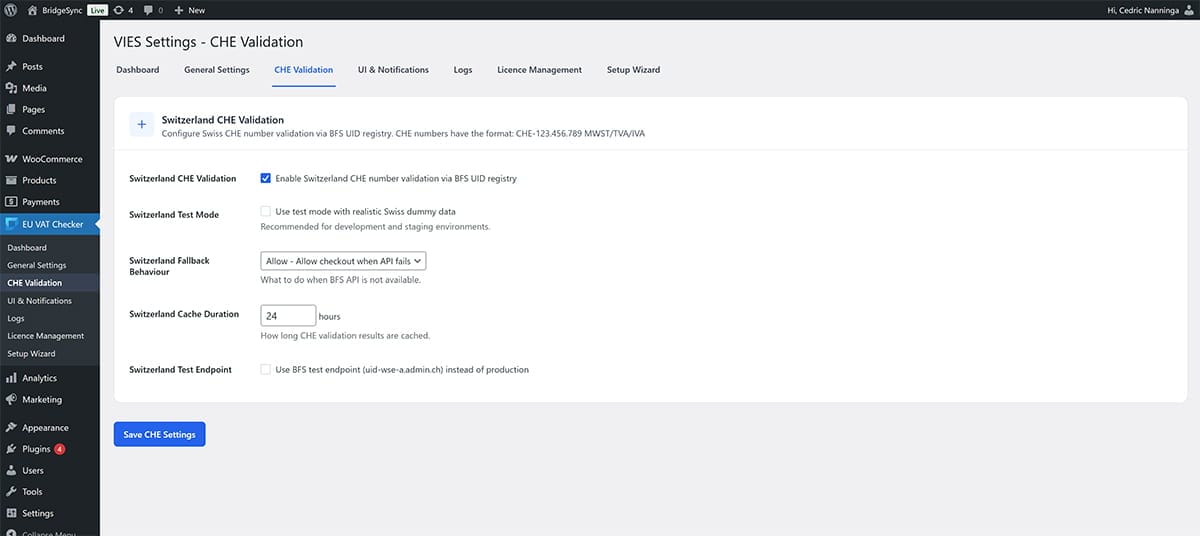
Swiss UID (CHE) validation is optional. Enable it if you sell to Swiss businesses and want BridgeSync to validate CHE numbers automatically.
Enable Swiss UID validation
- Go to EU VAT Checker → CHE Validation
- Enable Swiss UID validation
- Review any Swiss-specific settings on the page
- Click Save to apply changes
Check Swiss UID connectivity
If Swiss validation fails, first confirm your server can reach the Swiss UID API:
- Go to EU VAT Checker → Dashboard
- Find the Environment Status section
- Check that Swiss UID reachability shows ✓ 200 OK
CHE format
CHE-123.456.789 or CHE123456789. If your customers often paste spaces or punctuation inconsistently, test both formats to confirm the field handling on your checkout.