


Change the messages customers see during VAT validation — loading, valid, invalid, country mismatch and more. You can also customise the colours for each validation state.
Where to find message settings
- Go to EU VAT Checker → UI & Notifications in your WordPress sidebar
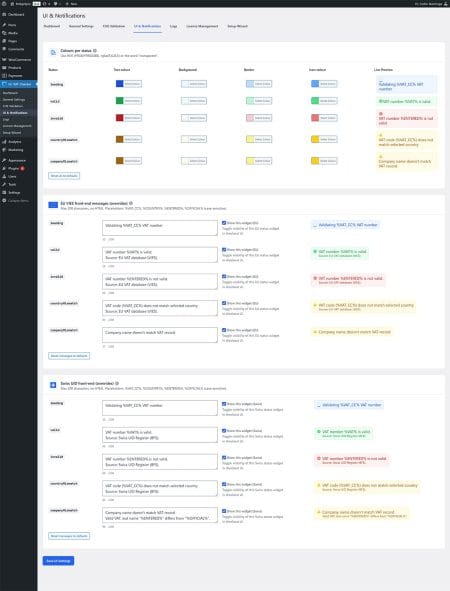
This page is divided into three main sections:
- •Colours per status — Change the appearance of validation messages
- •EU VIES front-end messages — Customise messages for EU VAT validation
- •Swiss UID front-end messages — Customise messages for Swiss validation
Change message colours
The Colours per status section lets you customise how each validation state looks at checkout:
| Status | When it appears | Default colour |
|---|---|---|
| loading | While validation is in progress | Blue |
| valid | VAT number is confirmed valid | Green |
| invalid | VAT number is not valid or not found | Red |
| countryMismatch | VAT country code doesn’t match billing country | Amber/Yellow |
| companyMismatch | Company name doesn’t match VAT registration | Amber/Yellow |
For each status, you can customise:
- •Text colour — The message text colour
- •Background — The message box background
- •Border — The message box border
- •Icon colour — The status icon colour
Use HEX colours (#RRGGBB), RGBA (rgba(R,G,B,A)), or the word transparent.
Click Reset all to defaults to restore the original colours.
Customise message text
The EU VIES front-end messages section lets you change what customers see during validation. Each message includes:
- •Message text field — Edit the message (max 200 characters, no HTML)
- •Show this widget checkbox — Toggle whether this message type appears at checkout
- •Live Preview — See how the message looks with your colour settings
Available placeholders
Use these placeholders to insert dynamic values into your messages (case-sensitive):
| Placeholder | What it shows | Example output |
|---|---|---|
%VAT% |
The full validated VAT number | NL123456789B01 |
%VAT_CC% |
The country code from the VAT number | NL |
%COUNTRY% |
The selected billing country | Germany |
%ENTERED% |
The VAT number as entered by the customer | NL 1234 5678 9B01 |
%OFFICIAL% |
The registered company name from VIES/BFS | BridgeSync B.V. |
Default messages
| Status | Default message |
|---|---|
| loading | Validating %VAT_CC% VAT number |
| valid | VAT number %VAT% is valid. Source: EU VAT database (VIES). |
| invalid | VAT number %ENTERED% is not valid. Source: EU VAT database (VIES). |
| countryMismatch | VAT code (%VAT_CC%) does not match selected country. Source: EU VAT database (VIES). |
| companyMismatch | Company name doesn’t match VAT record |
Swiss UID messages
The Swiss UID front-end messages section works the same way, but applies when customers enter Swiss CHE numbers. The default messages reference “Swiss UID Register (BFS)” instead of “EU VAT database (VIES)”.
Save your changes
After customising colours or messages, click Save UI Settings at the bottom of the page.
Click Reset messages to defaults to restore the original message text (this doesn’t reset colours).
Tips for multilingual stores
- •Keep messages short — they’re easier to translate with WPML or Polylang
- •Avoid idioms or culture-specific phrases
- •Test messages in all languages your store supports