


BridgeSync installatiewizard
Connect your WooCommerce store to bol.com with a guided setup that covers your license, API credentials, sync rules, publishing settings, and order flow.
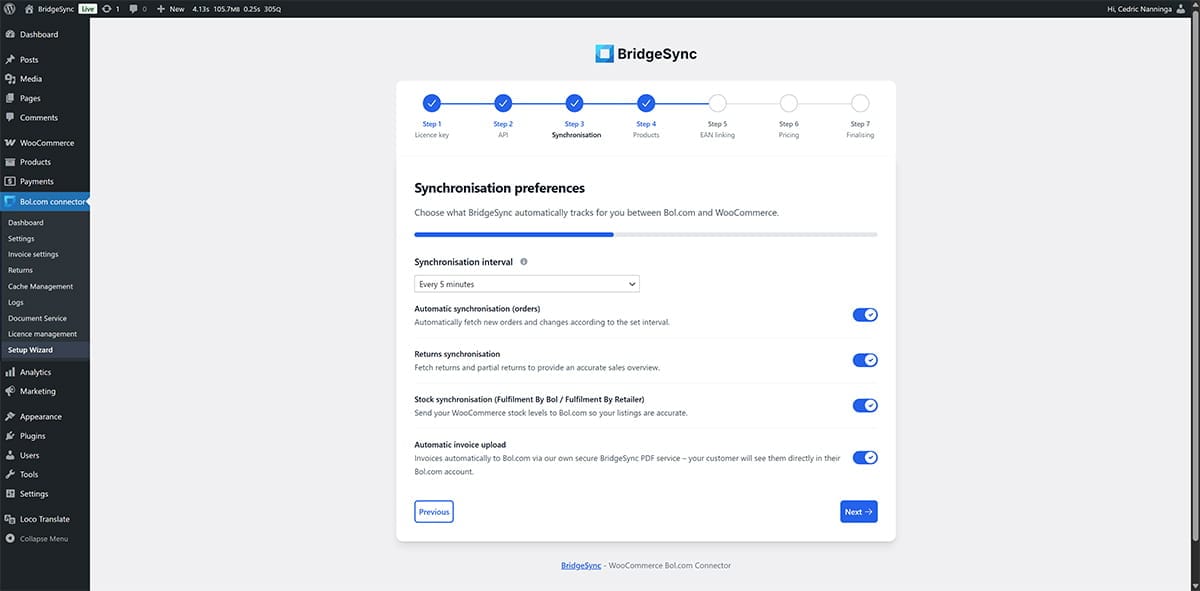
Setup Wizard voor Bol.com Connector
De wizard leidt je stap voor stap door de installatie.
Validate your license key
Enter your BridgeSync license key to activate the connector.
Real-time validation confirms whether the key is active and available.
Clear error messages help you resolve invalid or expired licenses quickly.
Connect your bol.com API
Add your Client ID, Client Secret, and Retailer ID.
Secure token handling verifies the connection before you continue.
Switch between sandbox and live credentials whenever you need to test safely.
Configure synchronization preferences
Choose which data to sync, including products, prices, stock, orders, and invoices.
Set schedules and define which product statuses may be published.
Define priority rules for handling conflicts between WooCommerce and bol.com.
Configure publishing settings
Map WooCommerce categories to the correct bol.com categories.
Decide whether products are published immediately or reviewed first.
Apply margin and pricing rules based on your WooCommerce catalog.
Set up shipping and order handling
Configure your shipping workflow for carriers or bol.com fulfillment.
Send track & trace updates automatically where supported.
Connect providers such as MyParcel and Sendcloud to streamline dispatch.
Run your first synchronization
Test the connection before you go live.
Review the synchronization results in the dashboard.
Confirm that products, stock, and orders are flowing as expected.
Beveiliging en foutafhandeling
Gebouwd met strikte beveiligingsmaatregelen en intelligente validatie.
Ingebouwde bescherming
Nonce- en CSRF-validatie zijn geïmplementeerd voor verbeterde beveiliging.
Formulieren gebruiken AJAX
Alle processen werken in realtime voor een naadloze ervaring.
Licentiecontroles zijn automatisch.
Dit voorkomt misbruik en ongeldige activeringen.
Veilig om te hervatten
Pauzeer de installatie wanneer dat nodig is en ga later verder zonder je configuratie te verliezen.
Moderne technologieën
De wizard gebruikt moderne technieken voor een optimale, snelle en intuïtieve ervaring.
Intuïtieve interface
Een responsieve gebruikersinterface, moderne front-endpatronen en AJAX zorgen ervoor dat het installatieproces snel en gemakkelijk te volgen is.
Transparante logging
Duidelijke WordPress-logs versnellen troubleshooting en maken ondersteuning eenvoudiger wanneer je hulp nodig hebt.
De voortgang wordt automatisch opgeslagen tijdens het instellen.
Je kunt pauzeren wanneer je maar wilt en later hervatten zonder gegevens te verliezen.
Samenvatting
De BridgeSync Setup Wizard helpt je snel en veilig aan de slag te gaan met alle drie de producten. Je kunt ze activeren, de installatie in slechts een paar minuten voltooien en klaar zijn om je winkel soepel te laten draaien.
Snelle installatie
Klaar in enkele minuten.
Beveilig
Robuuste beveiligingsmaatregelen en validaties op elk niveau.
Gemakkelijk te gebruiken
Duidelijke richtlijnen en beknopte boodschappen.
Flexibel
Pauzeer de installatie en ga verder zonder je voortgang te verliezen.