


BridgeSync Setup Wizard
Generate professional invoices, credit notes, and packing slips automatically with a guided WooCommerce setup.
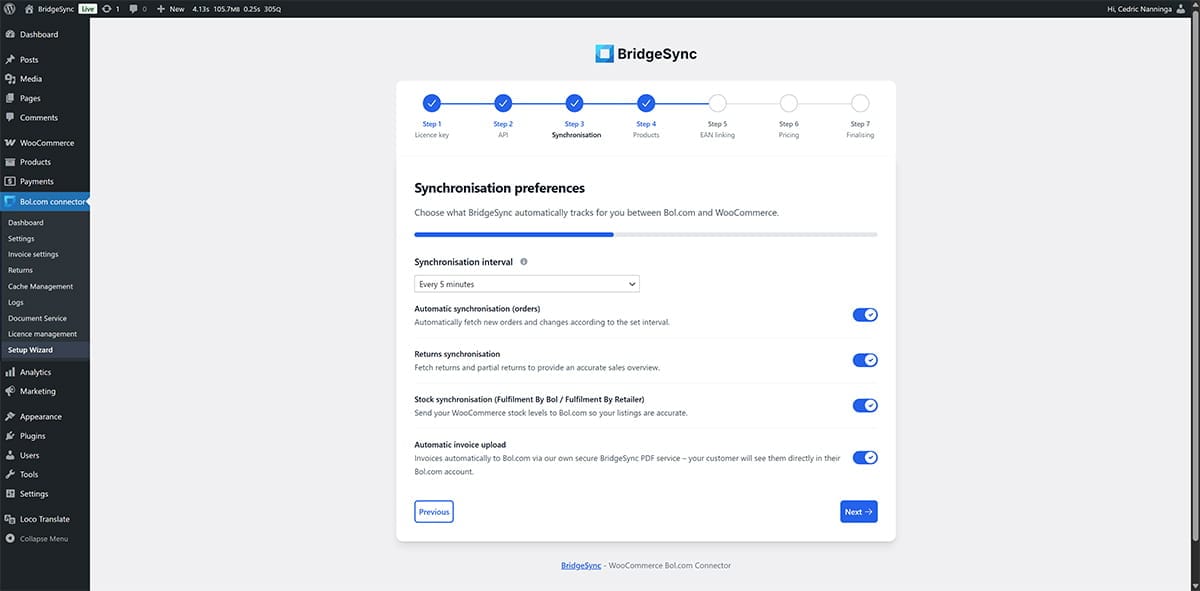
Setup Wizard for PDF Invoices & Documents
The wizard will guide you through the installation step-by-step.
Validate your licence key
Enter your BridgeSync licence key to activate the document suite.
Real-time validation confirms whether the licence is active and available.
Clear error messages help you resolve invalid or expired licences quickly.
Configure templates and branding
Choose templates for invoices, credit notes, and packing slips.
Set your logo, colours, fonts, and visible document fields.
Align every document with your store branding before you go live.
Set numbering and document sequences
Use separate numbering sequences for each document type.
Configure prefixes, yearly resets, and numbering consistency.
Keep your internal administration and compliance rules aligned.
Configure email attachments
Attach the right document automatically when order statuses change.
Support multilingual customer communication where required.
Keep your document flow consistent across manual and automated emails.
Review advanced document settings
Display VAT details, currencies, and international address formats correctly.
Enable multisite options and document security where needed.
Make sure every output matches your operational requirements.
Generate sample documents and go live
Generate sample PDFs to review the final output.
Choose the storage location and verify delivery settings.
Run final checks before enabling live document generation.
Security and error handling
Built with strict security measures and smart validations.
Built-in protection
Nonce and CSRF validation are implemented for enhanced security.
Forms use AJAX
All processes operate in real-time for a seamless experience.
Licence checks are automatic.
This prevents misuse and invalid activations.
Safe to resume
Pause setup whenever you need to and continue later without losing your configuration.
Modern technologies
The wizard uses modern techniques for an optimal, fast, and intuitive experience.
Intuitive interface
A responsive UI, modern front-end patterns, and AJAX keep the setup flow fast and easy to follow.
Transparent logging
Clear WordPress logs make troubleshooting faster and simplify support when you need help.
Progress is automatically saved throughout setup.
You can pause whenever you like and resume later without losing any data.
Summary
The BridgeSync Setup Wizard helps you get started quickly and safely with all three products. You can activate, complete setup in just a few minutes, and be ready to run your store smoothly.
Fast setup
Ready in minutes.
Secure
It has robust security measures and validations.
Easy to use
Clear guidance and concise messages.
Flexible
Pause the setup and resume without losing your progress.