


Time needed: About 5 minutes
What is a packing slip?
A packing slip is a document for warehouse picking and packing. It typically shows items, quantities, and shipping address — but not prices. Warehouse staff use packing slips to fulfil orders accurately.
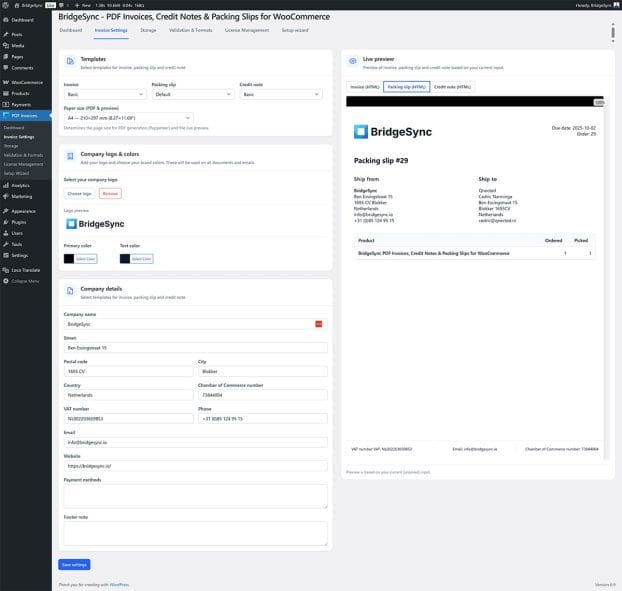
Choose a packing slip template
- Go to PDF Invoices → Invoice Settings
- In the Templates section, find the Packing slip dropdown
- Choose Default, Basic, or Modern
- Check the Live preview — click the "Packing slip (HTML)" tab
- Click Save settings
Generate a packing slip for one order
- Go to WooCommerce → Orders
- Open the order you want to pack
- In the PDF Invoices meta box (order sidebar), click Packing Slip
- The PDF opens in a new tab — print or save it
Bulk print packing slips
- Go to WooCommerce → Orders
- Select multiple orders using the checkboxes
- From the Bulk actions dropdown, select Print Packing Slips
- Click Apply
- A combined PDF opens containing all selected packing slips
Attach packing slips to emails
If you want customers to receive packing slips by email (useful for some workflows):
- Go to PDF Invoices → Dashboard
- In the Setup Wizard settings or during initial setup, enable Attach packing slip to "Customer Processing" email
- Click Save changes
Note: Most stores keep packing slips internal (not emailed to customers). Only enable this if your workflow requires it.
Configure packing slip filename
- Go to PDF Invoices → Storage
- Find Packing slip filename pattern
- Edit the pattern (default:
packing-slip-{packing_number}.pdf) - Click Save changes
What appears on packing slips
Packing slips include:
- Your company logo and details
- Customer shipping address
- Order number and date
- Product names and quantities
- SKUs (if available in WooCommerce)
- Customer notes (if any)
Packing slips do not include prices, totals, or payment information.
Verify
Success: Packing slips print with the information your warehouse needs, without exposing prices to customers.