


Takes: 1 minute to adjust, applies immediately
Why sync frequency matters
Your synchronisation interval controls how often BridgeSync checks Bol.com for new orders, syncs stock levels and uploads invoices. BridgeSync uses Action Scheduler for reliable background processing, so your orders continue to synchronise even when your site has very little traffic.
Option 1: Set during Setup Wizard
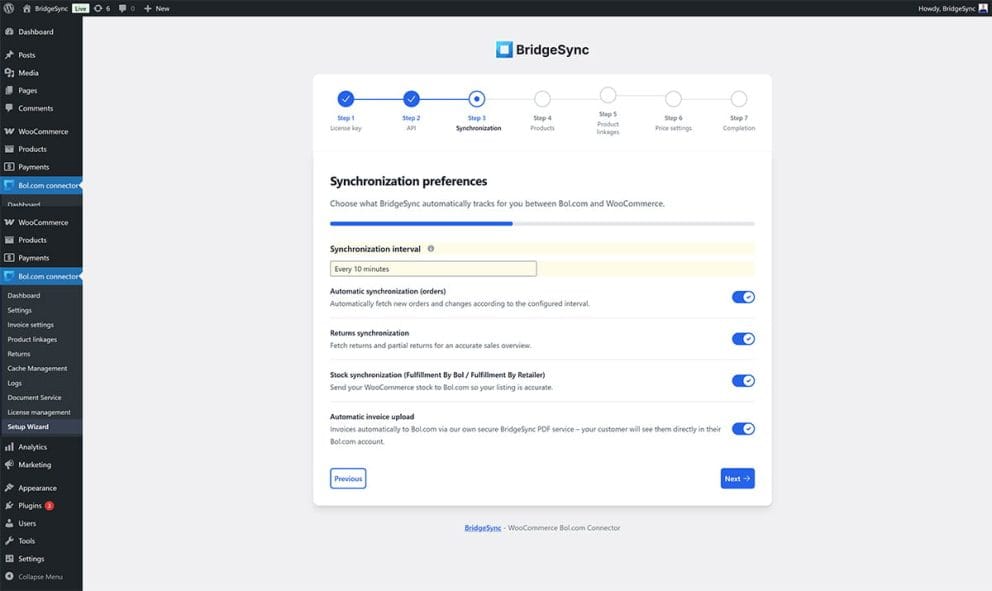
During initial setup, configure your sync interval in Step 3: Synchronisation:
- Open the Synchronisation interval dropdown
- Select your preferred interval
- Continue with the remaining wizard steps
Option 2: Change in Settings
Already completed the wizard? Adjust your sync interval anytime:
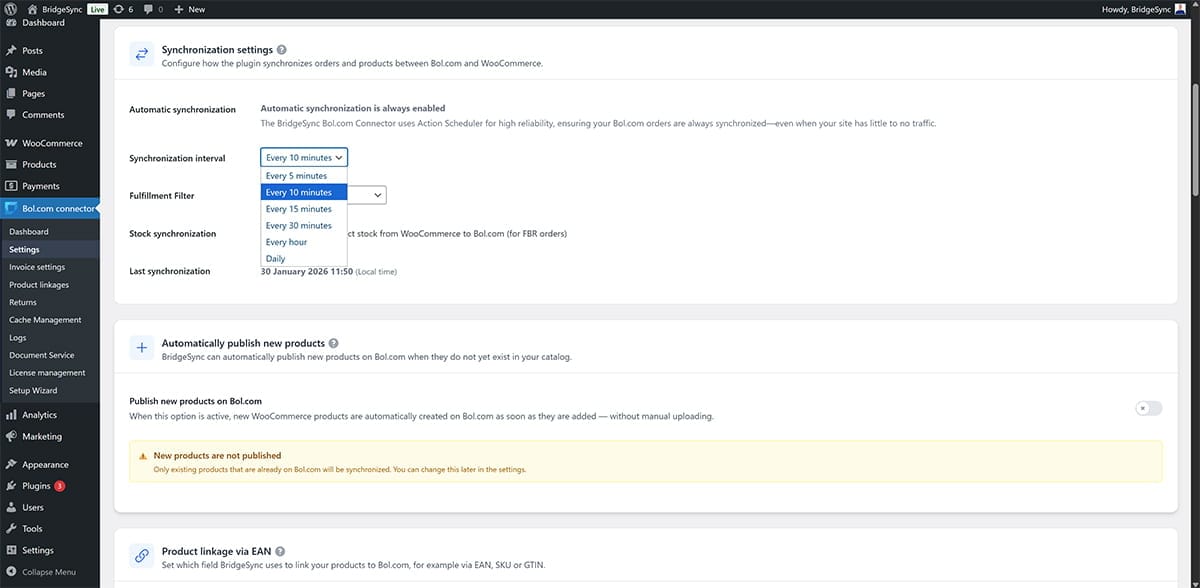
- Go to Bol.com connector → Settings in WordPress
- Scroll down to the Synchronisation settings section
- Open the Synchronisation interval dropdown
- Select your preferred interval
- The change applies automatically (no save button needed)
Available intervals
Choose the interval that matches your order volume:
- Every 5 minutes — For high-volume stores (20+ daily orders). Fastest updates, highest server usage.
- Every 10 minutes — For busy stores. Good balance of speed and performance.
- Every 15 minutes — Recommended for most stores. Default setting.
- Every 30 minutes — For smaller stores (5-15 daily orders). Lighter server load.
- Every hour — For low-volume stores. Minimal server impact.
- Daily — For occasional Bol.com sales only. Not recommended for active stores.
Note: Shorter intervals mean faster order imports but increase server load. If your site experiences slowdowns, try a longer interval.
Verify syncing is working
Check when BridgeSync last synchronised with Bol.com:
- Go to Bol.com connector → Settings
- Scroll to Synchronisation settings
- Check the Latest synchronisation timestamp at the bottom
The timestamp shows the date and time of the last successful sync. If this timestamp updates at your chosen interval, synchronisation is working correctly.
Tip: BridgeSync uses WordPress Action Scheduler, which runs independently of site visitors. Your Bol.com orders will continue to sync reliably, even during low-traffic periods.